

In This Article
Somewhere around 2 a.m., every new parent has stood frozen in a dark nursery, staring at a chest that seems to have stopped moving, only to exhale in relief when it rises again. That single moment — equal parts love and low-grade panic — is exactly why the wifi sleep sack monitor category exists. These devices pair a wireless connection with some form of breathing, movement, or vital-sign tracking so you can check on your baby from the kitchen, the next room, or a hotel lobby three states away without leaning over the crib rail every twenty minutes.

This guide breaks down seven real, currently available products, from FDA-cleared wearables to camera systems that read breathing motion through patterned sleepwear. We researched actual specifications, aggregated review sentiment, and independent testing data rather than repackaging manufacturer marketing copy. A wifi sleep sack monitor, put simply, is a wireless-connected device — worn, clipped on, or placed nearby — that tracks a sleeping infant’s breathing, movement, or vitals and sends real-time alerts to a parent’s phone or base station.
None of these products replace safe sleep practices. The American Academy of Pediatrics and independent researchers have been consistent on this point for years: monitors add reassurance, not protection. What they can do well is cut down the number of times you creep into the nursery to squint at a chest in the dark. Below, we’ve organized budget, mid-range, and premium options, along with the practical setup advice, comparison data, and buyer scenarios that Amazon listings never quite cover.
Quick Comparison Table
| Product | Type | Connectivity | Best For |
|---|---|---|---|
| Owlet Dream Sock | Foot-worn wearable | Bluetooth + 2.4GHz WiFi | FDA-cleared vitals tracking |
| Nanit Pro Camera + Breathing Wear | Camera + sleep sack | WiFi | Contact-free breathing motion |
| eufy Smart Sock S340 | Sock + pan/tilt camera | BLE + WiFi | Bundled vitals and video |
| Sense-U Pro Baby Monitor | Clip-on sensor | Bluetooth Low Energy | Rollover and temperature alerts |
| MonBaby Smart Baby Monitor | Snap-on clip | Bluetooth | Budget breathing tracking |
| Momcozy Smart WiFi Baby Monitor | Camera | WiFi | Budget travel-friendly video |
| Babysense True Sleep | Under-mattress pad + camera | WiFi | Non-contact, nothing worn |
Looking at the spread above, the split really comes down to whether you want something touching your baby’s body at all. Owlet Dream Sock and eufy Smart Sock S340 put a sensor on the foot, Sense-U Pro Baby Monitor and MonBaby Smart Baby Monitor clip onto clothing or a diaper, while Nanit Pro Camera + Breathing Wear and Babysense True Sleep track breathing without touching the baby at all. That distinction matters more than most buying guides admit, since it shapes both comfort and how often you’ll deal with a sensor sliding out of place at 3 a.m.
💬 Just one click — help others make better buying decisions too!😊
What Is a wifi sleep sack monitor?
A wifi sleep sack monitor is a wireless nursery device that connects to your home network or Bluetooth to track an infant’s breathing, movement, or vital signs while they sleep, then pushes real-time alerts to a caregiver’s smartphone app or bedside base station if something looks off. Some versions attach directly to the baby (a sock or clip), while others read motion contactlessly through a camera or under-mattress pad.
The category grew out of a fairly simple parental itch: audio-only monitors tell you when a baby is crying, but they say nothing about a baby who’s gone quiet in a way that isn’t restful sleep. A large-scale review analysis of infant monitoring products found that typical prices cluster around $190, spanning roughly $60 to $500 across the category, and that reviews skew heavily toward the extremes — a strong majority land at five stars, while a meaningful minority land at one star, a split that suggests these devices work beautifully for some households and frustrate others over the very same features. For a deeper look at how researchers coded that review data, the full study on infant sleep monitoring technologies is worth a read before you commit to a purchase.
Top 7 wifi sleep sack monitor Picks: Expert Analysis
1. Owlet Dream Sock — first FDA-cleared over-the-counter pulse oximeter
The standout here isn’t the wireless range, it’s the regulatory paper trail: the Owlet Dream Sock cleared FDA De Novo review in January 2024 as the first over-the-counter consumer baby monitor of its kind, a milestone most competitors simply can’t claim. The fabric sock wraps around a baby’s foot and uses photoplethysmography — the same principle as a hospital finger clip — to read pulse rate and blood oxygen saturation continuously, syncing over Bluetooth to a base station and over 2.4GHz WiFi to the Owlet Dream App. Clinical testing reported accuracy within about 3 percentage points of gold-standard arterial blood gas readings across a range of skin tones, and the device flags low pulse, high pulse, or low oxygen the moment a reading drifts outside a preset zone.
Based on the spec comparison with the rest of this list, the Owlet Dream Sock is squarely aimed at parents who want measured data, not just motion inference, and it’s the clearest pick for families of premature infants or babies with a pediatrician-flagged reason to watch oxygen levels closely. Reviewers consistently note that the base station’s glowing indicator (green when normal, red with an alarm when readings fall outside range) is easy to glance at from across a dark room, though some parents on retail platforms mention the fabric sock needs a snug, correctly sized fit or readings get noisy. It comes in two sock sizes for infants 1 to 18 months and 6 to 30 pounds.
Pros:
- ✅ Only FDA-cleared over-the-counter pulse oximetry monitor
- ✅ Real oxygen and pulse data, not just motion guessing
- ✅ No subscription required for core alert features
Cons:
- ❌ Premium price compared to clip-on alternatives
- ❌ Sock fit sensitivity can trigger false alerts if loose
Expect to pay around $300 for the standalone sock, base station, and four fabric socks. For the data quality on offer, that price sits at the higher end but delivers a genuinely different category of monitoring than a camera alone.
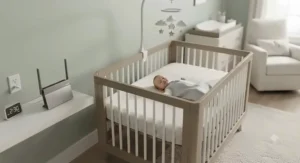
2. Nanit Pro Camera + Breathing Wear — contact-free breathing motion through patterned sleepwear
What sets the Nanit Pro Camera + Breathing Wear apart is that nothing touches your baby at all. The system pairs a 1080p overhead WiFi camera with “Breathing Wear” — sleep sacks and pajamas printed with a specific pattern the camera’s computer vision reads to detect the rise and fall of a baby’s chest, translating fabric movement into a live breathing-motion readout in the app. On paper this means you get continuous breathing tracking without any wearable electronics near your baby’s skin, which is a meaningfully different trade-off than a foot sock or clip.
Here’s what to weigh: the core video feed and crying/motion alerts work without a subscription, but the deeper sleep analytics and historical breathing trend graphs sit behind Nanit’s optional Insights subscription, so your all-in cost depends on how much data you actually want. What most buyers overlook about this model is that the camera remembers up to ten saved WiFi networks and reconnects automatically, which matters if you travel with grandparents or split time between homes. Aggregated review sentiment across retail platforms is generally strong on video clarity and night vision, with a recurring complaint being the added cost of replacement Breathing Wear sleep sacks as babies size up.
Pros:
- ✅ Zero electronics or sensors touching the baby
- ✅ Sharp 1080p video with reliable night vision
- ✅ Portable Flex Stand option for travel
Cons:
- ❌ Deepest sleep insights require a paid subscription
- ❌ Replacement Breathing Wear sleepwear adds ongoing cost
Camera-only bundles start around the $280-$400 range depending on whether you add extra Breathing Wear sizes, putting this squarely in premium territory once you factor in a year of Insights.
3. eufy Smart Sock S340 — bundled vitals sock and pan-tilt camera in one purchase
The eufy Smart Sock S340 is built for parents who don’t want to buy a wearable and a camera separately. The sensor sock tracks heart rate and blood oxygen with up to 48 hours of historical data, while the paired 2K pan-and-tilt camera adds AI cry detection and non-invasive night vision, all reporting into one app with no monthly subscription fee. The sock itself runs about 24 hours per charge and comes in three sizes to fit babies from birth to 18 months, connecting to its base via Bluetooth Low Energy while the base and camera talk to your phone over 2.4GHz WiFi.
What the spec sheet won’t tell you, but reviewer patterns suggest, is that the value proposition here is real: getting a sock, a base, and a 2K camera in one no-subscription package undercuts buying a comparable sock-plus-camera combo from other brands separately. One recurring theme in real owner feedback is occasional false alerts when the sock shifts position overnight, and at least one parent reported the “please check on your baby” voice alert firing loudly in the middle of the night after the sock slipped — worth testing fit carefully in the first week. eufy is explicit in its own documentation that the eufy Smart Sock S340 is not a medical device and is not intended to diagnose, treat, or prevent any condition, including SIDS, which is a meaningfully different claim than Owlet’s FDA-cleared positioning.
Pros:
- ✅ Sock and 2K camera bundled with no monthly fee
- ✅ 24-hour battery life on the wearable sensor
- ✅ 48-hour historical heart rate and oxygen data
Cons:
- ❌ Not a medical device, unlike the FDA-cleared Owlet option
- ❌ Sock repositioning can trigger occasional false alerts
Pricing typically lands in the $200-$280 range for the full sock-and-camera bundle, with the sock-only version running lower, making this one of the stronger value plays among wearable options.
4. Sense-U Pro Baby Monitor — clip-on rollover and temperature tracking
Instead of a foot sock, the Sense-U Pro Baby Monitor uses a small sensor clip that snaps onto a diaper or the waistband of a sleep sack, connecting over Bluetooth Low Energy with a working range of roughly 50 feet and a notably low radiation output compared to continuous WiFi wearables. The chip inside tracks breathing motion and alerts caregivers if it detects a pause pattern, while also flagging stomach-sleeping position and ambient temperature swings, all pushed to a phone app rather than requiring a dedicated base station.
Based on the spec comparison, this design trades some of the constant-connection convenience of a full WiFi system for a lighter, lower-profile footprint that some parents find easier to keep attached through a night of squirming. Reviewers consistently describe the clip as genuinely low-fuss to set up, and its rollover detection tends to get singled out as the most-used feature once babies start rolling around four to six months, which is exactly when back-sleeping compliance becomes harder to maintain. The trade-off is that Bluetooth-only designs generally have a shorter effective range than full WiFi camera setups, so monitoring from another floor of the house isn’t the strong suit here.
Pros:
- ✅ Low-profile clip fits diapers and clothing easily
- ✅ Tracks rollover position alongside breathing pattern
- ✅ Lower radiation output than always-on WiFi wearables
Cons:
- ❌ Bluetooth range shorter than full WiFi camera systems
- ❌ No continuous video feed included in the base kit
The Sense-U Pro Baby Monitor generally sits in the $100-$150 range, positioning it as a mid-tier option between budget clips and full vitals-tracking socks.
5. MonBaby Smart Baby Monitor — budget snap-on breathing and rollover tracker
For parents priced out of sock-based vitals monitors, the MonBaby Smart Baby Monitor offers a genuinely budget-friendly entry point. Its patented snap-on button attaches to virtually any outfit or diaper without needing a dedicated sleep sack, tracking breathing pattern and sending audible phone alerts if it detects a pause, alongside real-time and historical breathing graphs and rollover notifications when a baby shifts onto their stomach. At roughly 9 inches long, 1.5 inches wide, and a fraction of an inch thick, weighing well under a quarter pound, it’s about as unobtrusive as wearable monitors get.
The spec sheet won’t tell you this, but user reports suggest the snap-on design is the feature parents mention most, since it removes the “does this fit our sleep sack” question entirely — it clips onto whatever the baby happens to be wearing that night, sleep sack, pajamas, or diaper alike. On the flip side, because it’s Bluetooth-based rather than a full WiFi system, its effective monitoring range is tighter than camera-based setups, and it lacks the vitals depth (oxygen, heart rate) that pulse-oximetry wearables like Owlet Dream Sock provide.
Pros:
- ✅ Snap-on design attaches to any outfit, no sizing needed
- ✅ Real-time and historical breathing graphs in-app
- ✅ Noticeably lower price than sock-based competitors
Cons:
- ❌ No oxygen or heart rate tracking included
- ❌ Bluetooth range limited compared to WiFi camera systems
Typical pricing lands in the $60-$100 range, making this one of the more accessible entry points if breathing and rollover alerts are your main priority.

6. Momcozy Smart WiFi Baby Monitor — flexible budget video with travel-friendly setup
The Momcozy Smart WiFi Baby Monitor leans into flexibility rather than medical-grade sensing. It’s a straightforward WiFi camera delivering 1080p video with two-way audio and app-based remote viewing, positioned for parents who want to check on a sleeping baby from another room or another building without paying for pulse-oximetry hardware they may not need. Setup revolves around a standard 2.4GHz WiFi connection, and the compact camera body travels reasonably well for hotel stays or visits to relatives.
Here’s what to weigh: this is a video-first monitor, so it infers a baby’s status from what you can see rather than measuring breathing motion or vitals directly, which puts it closer to a traditional audio-video monitor with WiFi added than to the wearable or breathing-motion systems higher up this list. Aggregated buyer feedback on flexible WiFi cameras in this price bracket tends to praise the low barrier to entry and multi-location use, while noting that budget camera sensors generally show more visible grain in low light than premium options like Nanit Pro Camera + Breathing Wear.
Pros:
- ✅ Genuinely budget-friendly WiFi camera option
- ✅ Works well for travel and multi-location viewing
- ✅ Simple app setup without a base station required
Cons:
- ❌ No breathing motion or vitals sensing built in
- ❌ Lower-light video quality trails premium camera picks
Expect a price range of roughly $50-$90, making this the most accessible pure-video option on this list, best paired with a separate breathing-aware sleep sack if vitals data matters to you.
7. Babysense True Sleep — non-contact under-mattress breathing detection
The Babysense True Sleep takes an entirely different approach: instead of anything worn or clipped on, a sensor pad sits under the crib mattress and detects micro-movements from breathing, triggering an audio and vibration alert if motion stops for a set period. It’s paired with a 5-inch HD video monitor over WiFi for remote viewing, so you get both the contact-free breathing detection and a standard camera feed in one system, with the company describing the underlying motion-sensing technology as hospital-trusted.
What most buyers overlook about this model is that “nothing touches the baby” cuts both ways — there’s no sock to size correctly or clip to snap on, but the pad’s accuracy depends heavily on correct placement and a firm, flat mattress setup that matches AAP-recommended sleep surfaces anyway. Reviewers consistently frame this as the pick for parents who specifically don’t want wearable electronics near their baby’s skin, while noting that thick, padded sleep sacks or heavier babies moving around can occasionally cause detection quirks that need a firmware or sensitivity adjustment to settle down.
Pros:
- ✅ Nothing worn or clipped onto the baby at all
- ✅ Combines breathing detection with a full video feed
- ✅ No skin contact means no sizing or fit issues
Cons:
- ❌ Requires precise mattress and pad placement
- ❌ Thicker sleep sacks can occasionally affect accuracy
The Babysense True Sleep typically runs in the $150-$220 range, landing it as a solid mid-premium pick for parents prioritizing a fully non-contact setup.
Top 7 Products: Specs and Value Comparison
| Product | Sensing Method | Battery/Power | Price Range | Best For |
|---|---|---|---|---|
| Owlet Dream Sock | Pulse oximetry (foot) | ~16-hr rechargeable | Around $300 | Measured oxygen/pulse data |
| Nanit Pro Camera + Breathing Wear | Camera + pattern reading | Plugged in | $280-$400 range | Contact-free breathing motion |
| eufy Smart Sock S340 | PPG sock + camera | ~24-hr rechargeable | $200-$280 range | Bundled vitals and video |
| Sense-U Pro Baby Monitor | BLE clip sensor | Replaceable/rechargeable | $100-$150 range | Rollover and temperature |
| MonBaby Smart Baby Monitor | BLE snap-on clip | Rechargeable | $60-$100 range | Budget breathing tracking |
| Momcozy Smart WiFi Baby Monitor | WiFi camera | Plugged in | $50-$90 range | Budget travel video |
| Babysense True Sleep | Under-mattress pad + camera | Plugged in | $150-$220 range | Fully non-contact setup |
The value story shifts depending on what you’re optimizing for: Owlet Dream Sock justifies its higher price with actual FDA-cleared vitals data, while MonBaby Smart Baby Monitor and Momcozy Smart WiFi Baby Monitor deliver real functionality at a third of the cost by trading vitals depth for simpler breathing or video-only tracking. If contact-free monitoring specifically is the deciding factor, Nanit Pro Camera + Breathing Wear and Babysense True Sleep are the two products on this list built around that constraint from the ground up.
<h4>✨ Don’t Miss These Exclusive Deals!</h4> 🔍 Take your nursery setup to the next level with these carefully selected picks. Click on any highlighted product to check current pricing and availability. These tools help you build the kind of authentic peace of mind every sleep-deprived household deserves!
Practical Usage Guide: Setting Up Your app enabled sleep sack System
Getting a wifi sleep sack monitor running smoothly in the first week matters more than most product pages let on, since a shaky setup is where false alarms tend to cluster. Start by connecting the base unit or camera to a dedicated 2.4GHz network rather than a mixed-band router setting; most wearables and cameras rely on 2.4GHz specifically because it penetrates walls better than 5GHz, even though it’s technically slower. If your router broadcasts a combined network name, check the settings for a way to split the bands, or the device may struggle to reconnect after a brief outage.
For any app enabled sleep sack or wearable sensor, fit is the single biggest factor in false-alert frequency during the first thirty days. A sock or clip that’s slightly loose will register far more noise than one snugged correctly, so recheck the fit every few nights as your baby grows, especially through early growth spurts. Camera-based systems need a stable, unobstructed overhead angle — mounting height and crib placement both affect how reliably the system reads breathing motion through patterned sleepwear.
Common first-month mistakes include letting the app’s notification settings default to maximum sensitivity, which tends to generate the “everything is an emergency” fatigue that leads parents to disable alerts altogether. Dial sensitivity down gradually instead of all at once, and keep the charging base or camera mount in the exact same spot each night so the system has consistent conditions to compare against. Most manufacturers recommend a brief daily wipe-down of wearable sensors with a damp cloth rather than machine washing, since moisture near the sensor contacts is the most common cause of connectivity drop-outs reported in owner forums.
Real-World Scenarios: Matching a connected sleep sack baby Monitor to Your Family
The anxious first-time parent, six weeks postpartum. If you’re checking the baby monitor app every fifteen minutes regardless of what it shows you, a data-rich option like Owlet Dream Sock can genuinely help, but only if you also set realistic alert thresholds with guidance from your pediatrician rather than the tightest possible settings. Pairing it with a plain camera for visual reassurance, rather than layering three separate alert systems, tends to reduce anxiety more than it adds.
The family that travels often, visiting grandparents every few months. A connected sleep sack baby setup that isn’t tied to a single home network matters here. Nanit Pro Camera + Breathing Wear‘s ability to remember multiple WiFi networks and the portable Flex Stand mount make it easier to maintain the same breathing-motion tracking wherever you’re staying, without re-pairing hardware from scratch each trip.
The budget-conscious household adding a second baby monitor for a toddler’s room. Not every situation calls for premium vitals tracking. MonBaby Smart Baby Monitor or Momcozy Smart WiFi Baby Monitor cover the basics — breathing or video reassurance — at a price point that makes sense for a secondary unit rather than a primary nursery investment.
Problem to Solution Guide: Fixing Common breathing monitor sleep sack Alerts
Problem: Frequent false alarms overnight. This is usually a fit or placement issue rather than a device defect. Baby movement and thick sleep sacks can also trigger these notifications, and an unstable WiFi signal is the most commonly overlooked cause, so checking your router’s signal strength and trying the 5GHz band for a more stable connection is worth doing before assuming the hardware is faulty.
Problem: The sensor keeps disconnecting mid-night. Check that the wearable or camera hasn’t drifted onto a weaker WiFi channel, and confirm the charging base is fully seated; loose magnetic connections on sock-style chargers are a frequent, easily fixed culprit.
Problem: You’re not sure when to stop close monitoring. There’s no universal rule here, but many parents naturally scale back close nighttime monitoring once a baby reaches around six months, as sleep routines and physical control both strengthen past that point, and any baby with a medical history related to breathing or prematurity should have that timeline set by a pediatrician instead.
Problem: You’re worried about wireless radiation exposure. Consumer baby monitors emit wireless signal energy broadly comparable to everyday household devices like a WiFi router, and current evidence does not point to added risk from normal overnight use, though clip-on Bluetooth Low Energy devices like Sense-U Pro Baby Monitor are specifically marketed around lower output than always-on WiFi wearables if that’s a priority for you. For more on how experts frame this trade-off, see this overview of monitoring baby breathing and vitals at home.
Problem: Alert fatigue is making you ignore notifications. Lower sensitivity gradually rather than turning alerts off entirely, and separate “informational” notifications (wakings, movement) from “urgent” ones (breathing pause, oxygen threshold) in the app settings if your device supports tiered alerts.
How to Choose a wifi sleep sack monitor
- Decide if you want contact or contact-free sensing first. This single choice narrows your options faster than any spec comparison, separating socks and clips like Owlet Dream Sock and MonBaby Smart Baby Monitor from camera and mattress-pad systems like Nanit Pro Camera + Breathing Wear and Babysense True Sleep.
- Match the sensing depth to an actual need, not marketing appeal. Full pulse-oximetry data matters most for premature infants or pediatrician-flagged concerns; healthy full-term babies may not need more than motion or breathing-pattern tracking.
- Check whether core alerts require a subscription. Some systems, like Nanit Pro Camera + Breathing Wear, gate deeper analytics behind a paid tier, while others, like eufy Smart Sock S340, bundle everything into the upfront price.
- Confirm your router supports a stable 2.4GHz connection. Nearly every device on this list depends on it, and skipping this check is the single most common cause of post-purchase frustration.
- Factor in battery life against your actual bedtime routine. A 16-hour battery is fine if you charge nightly during a bath routine; a 24-hour battery buys more forgiveness if some nights get chaotic.
- Think about growth, not just newborn size. Sock-based wearables need correctly sized replacements as feet grow, while clip-on and camera systems tend to scale more easily across a baby’s first 18 months.
- Read aggregated review themes, not star averages alone. A five-star average can still hide a recurring complaint pattern that only shows up once you scan several dozen reviews for the same issue.
wireless baby monitoring vs Traditional Audio-Only Monitors
Traditional audio-only monitors, the kind most parents grew up with, simply relay sound from the nursery to a handheld receiver. They’re reliable, cheap, and immune to WiFi outages, but they tell you nothing about a baby who has gone quiet in a way that isn’t peaceful sleep. wireless baby monitoring systems close that gap by adding breathing motion, vitals, or continuous video into the mix, at the cost of depending on a stable home network and, in some cases, a subscription for full functionality.
The honest trade-off is reliability versus depth of information. A basic audio monitor rarely has a firmware hiccup or a WiFi dropout at 2 a.m., while any networked system, however well-built, occasionally will. Reviewers weighing the two note that hybrid systems — cameras that fall back to local Bluetooth or a wired connection when WiFi drops — offer something of a middle ground, and it’s worth checking whether any product you’re considering has that fallback before committing.
smart wearable technology for Different Parenting Styles
Not every parent wants the same level of data, and that’s fine. Data-driven parents who appreciate charts and trend lines over months tend to get the most value from smart wearable technology like Owlet Dream Sock or eufy Smart Sock S340, where historical oxygen and heart rate graphs turn into genuinely useful pediatrician conversation starters. Parents who find constant data overwhelming, by contrast, often do better with a simpler breathing-pattern alert system like MonBaby Smart Baby Monitor, which flags problems without asking you to interpret a chart every morning.
There’s also a middle group: parents who want reassurance but specifically don’t want anything attached to their baby’s body overnight. For that group, Babysense True Sleep and Nanit Pro Camera + Breathing Wear are built around exactly that preference, trading a small amount of sensing precision for zero physical contact.
real time sleep tracking: What the Data Actually Means
Most of these systems report some version of real time sleep tracking — wakings, sleep stage estimates, breathing rate trends — but it’s worth understanding what that data can and can’t tell you. Sleep stage estimates on consumer devices are inferred from movement and breathing patterns rather than measured with clinical polysomnography, so treat the categories (light, deep, awake) as useful trend indicators rather than diagnostic-grade output.
Where this data earns its keep is in spotting patterns over weeks, not single nights: a gradual shift in wake windows, a consistent overnight breathing rate baseline, or a pattern of frequent short wakings that correlates with a growth spurt or teething. Reviewers who get the most long-term value from real time sleep tracking tend to check weekly summaries rather than obsessing over a single night’s graph, which also happens to be the healthier habit for parental sleep and anxiety.
Common Mistakes When Buying a Breathing Monitor
The most common mistake is buying based on brand recognition alone rather than matching sensing type to an actual concern. A healthy, full-term baby with no medical flags often doesn’t need pulse-oximetry precision, while a family managing a pediatrician-identified risk factor may find a basic clip-on breathing alert insufficient for their situation and should loop in their doctor on hardware choices.
A second frequent misstep is skipping the router check before purchase. Devices requiring 2.4GHz WiFi will struggle on networks that only broadcast 5GHz or on mesh systems that aggressively band-steer devices, and that mismatch causes a disproportionate share of the one-star reviews these products collect. Third, many buyers underestimate ongoing costs — replacement socks, subscription analytics tiers, or extra sleep sacks sized for a growing baby — and end up with a total cost of ownership well above the sticker price they budgeted for.
Long-Term Cost and Maintenance
Sock-based wearables like Owlet Dream Sock and eufy Smart Sock S340 carry ongoing costs beyond the initial purchase: replacement socks as feet grow, and eventually a full sensor replacement once the rechargeable battery degrades, typically somewhere past a year of nightly use. Camera-based systems like Nanit Pro Camera + Breathing Wear shift the ongoing cost toward a subscription for deeper analytics rather than hardware, while budget clip-on and camera options like MonBaby Smart Baby Monitor and Momcozy Smart WiFi Baby Monitor generally have the lowest total cost of ownership since there’s no subscription and minimal wearable wear-and-tear.
Maintenance itself is fairly light across the category: wipe sensors and clips with a damp cloth rather than submerging them, keep charging contacts free of lint, and check firmware update prompts in the app periodically, since manufacturers do occasionally push accuracy or connectivity improvements post-launch. Budgeting an extra $30-$60 a year for replacement parts or sock sizing is a reasonable rule of thumb for wearable-based systems specifically.
Safety, Regulations, and Compliance Guide
It bears repeating clearly: no monitor in this category, including the FDA-cleared Owlet Dream Sock, is a substitute for following safe sleep guidance. <cite index=”10-1″>According to The Lullaby Trust, there is no evidence that baby monitors prevent sudden infant death syndrome</cite>, and manufacturers themselves generally include that disclaimer in their own documentation. Safe sleep practices — back sleeping, a firm flat mattress, no loose bedding, and a baby’s own sleep space — remain the foundational safety layer regardless of which device you buy.
On the regulatory side, most products in this category, apart from Owlet Dream Sock‘s specific pulse-oximetry clearance, are marketed as wellness or sleep-insight devices rather than medical devices, meaning they aren’t held to the same clinical accuracy standards. You can review the FDA’s own clearance summary for the pulse-oximetry category directly through the FDA’s De Novo classification record, which spells out exactly what the clearance does and doesn’t claim. For families with a specific medical concern about an infant’s breathing or oxygen levels, a conversation with a pediatrician about prescription-grade monitoring options should come before any consumer device purchase.
Buyer’s Decision Framework
If you want measured vitals data and are comfortable with a premium price, choose Owlet Dream Sock because it’s the only FDA-cleared option on this list. If you specifically don’t want anything touching your baby overnight, choose between Nanit Pro Camera + Breathing Wear and Babysense True Sleep depending on whether you’d rather have breathing-pattern-through-fabric tracking or under-mattress motion sensing. If your budget is under $100 and breathing-pattern alerts matter most, choose MonBaby Smart Baby Monitor. If you want a bundled sock-and-camera system with no subscription, choose eufy Smart Sock S340. If you’re adding a second monitor for a sibling’s room or traveling frequently, choose Momcozy Smart WiFi Baby Monitor for its low cost and flexibility, or Sense-U Pro Baby Monitor if rollover detection specifically matters as your baby starts moving more.
Features That Actually Matter (And Those That Don’t)
Battery life, WiFi band compatibility, and whether core alerts require a subscription are the features that genuinely affect day-to-day satisfaction, based on the recurring themes in aggregated review data. A device with excellent sensing accuracy but a battery that dies mid-night, or an app that gates the one alert you actually need behind a paywall, will frustrate you regardless of how impressive the underlying sensor technology is.
What matters less than marketing copy suggests: exact video resolution above 1080p rarely changes the practical experience of checking on a sleeping baby, and extra “AI insight” features like mood detection or predictive sleep coaching are pleasant additions rather than core value. Reviewers consistently note that reliability of the basic alert — did it wake me when it needed to, and did it stay quiet when everything was fine — outweighs every secondary feature on the spec sheet.
<div></div>
Frequently Asked Questions
❓ Does a wifi sleep sack monitor need internet to work?
❓ Can a breathing monitor prevent SIDS?
❓ What size baby fits a wearable sock monitor?
❓ How do I stop false alerts on a wifi baby monitor?
❓ Is a camera or a wearable better for tracking breathing?
Conclusion
Choosing among these seven products really comes down to one honest question: how much precision do you need, and how much are you willing to put on your baby’s body to get it? Owlet Dream Sock remains the clearest choice if FDA-cleared vitals data matters to your family, while Nanit Pro Camera + Breathing Wear and Babysense True Sleep serve parents who’d rather keep sensors off their baby entirely. Budget-conscious households have real, functional options in MonBaby Smart Baby Monitor and Momcozy Smart WiFi Baby Monitor, and eufy Smart Sock S340 and Sense-U Pro Baby Monitor fill the middle ground with bundled features and rollover-specific tracking, respectively.
Whichever device you land on, treat it as a reassurance layer on top of safe sleep practices, not a replacement for them, and give yourself the first two weeks to dial in fit and alert sensitivity before judging whether a product is right for your family. The right wifi sleep sack monitor is the one that actually gets used consistently, fits your household’s tolerance for data, and lets everyone — baby included — get more uninterrupted sleep.
Recommended for You
- Smart Sleep Sack Newborn: 7 Best Picks Reviewed for 2026
- 7 Best sleep quality score baby monitor Picks for Exhausted Parents (2026)
- Sleep Cycle Tracking Baby Device: 7 Best Picks for 2026
Disclaimer: This article contains affiliate links. As an Amazon Associate, I earn from qualifying purchases. If you purchase products through these links, we may earn a small commission at no additional cost to you.
✨ Found this helpful? Share it with your friends! 💬🤗
