
In This Article
Somewhere around week three of parenthood, you realize you’ve forgotten whether the baby rolled over yesterday or the day before, and suddenly you’re standing in the nursery at 2 a.m. googling “baby milestone tracker device vs app” like it’s the most urgent question of your life. It kind of is. A baby milestone tracker device vs app decision comes down to this: a device is a piece of hardware — a wearable sock, a camera, a sensor — that passively collects biometric or behavioral data, while an app is software that relies on you to log information but adds structured guidance, reminders, and community context. Neither is universally “better.” One costs money upfront and runs quietly in the background; the other costs your attention and thumbs but adapts to whatever you’re actually worried about that week.

This guide walks through seven real products — three hardware devices, three apps, and one hybrid-adjacent free tool — pulled from actual retailer listings and verified specs as of 2026. We’ll compare what each one measures, what it costs (in ranges, never exact figures, since Amazon pricing shifts weekly), and who genuinely benefits from each. Whether you’re chasing a smart milestone tracking gadget for peace of mind or just want a free app that nudges you toward tummy time, you’ll leave this article with a shortlist instead of forty open tabs.
Quick Comparison: Baby Milestone Tracker Device vs App at a Glance
| Product | Type | Best For | Price Range |
|---|---|---|---|
| Owlet Dream Sock | Wearable device | Overnight vitals + sleep | $250-$300 range |
| Nanit Pro Camera | Video device | Sleep + growth timelapse | $280-$330 range |
| Miku Smart Baby Monitor | Contactless device | No-wearable breathing tracking | Around $400 |
| VAVA 5″ HD Monitor | Budget video device | Basic audio/video on a budget | $85-$150 range |
| Huckleberry: Baby & Child | App | Sleep scheduling + logging | Free–$15/mo range |
| BabySparks | App | Structured activity milestones | Free–$120/yr range |
| Pathways.org Baby Milestones | App | Free, AAP/CDC-backed tracking | Free |
Looking at this table, the split is obvious: hardware clusters in the $85-$400 range and does its job whether or not you remember to open an app, while software clusters near free-to-modest-subscription and does its job only if you remember to tap a button. If your priority is nighttime safety monitoring, a device wins; if it’s structured developmental coaching on a budget, an app wins.
💬 Not sure which lane fits your family? Bookmark this table — we’ll unpack every row below.
Top 7 Baby Milestone Tracker Devices and Apps: Expert Analysis
1. Owlet Dream Sock — wearable vitals tracking through the night
The standout here is that it’s worn directly on baby’s foot, turning overnight monitoring into something continuous rather than glance-based. The sensor tracks heart rate, blood oxygen, and sleep state, syncing to the Owlet Dream app roughly every few seconds, and the fabric sock fits infants up to about 30 pounds across included size variants. Based on the spec comparison with camera-only monitors, what most buyers overlook about this model is that it doesn’t require you to be near a screen at all — the base station itself glows and sounds an alert if readings drift outside preset ranges, which matters most for parents of preemies or babies with reflux who want a genuine wearable milestone tracker for babies rather than a passive camera feed.
Reviewers consistently note that the sock is comfortable enough that most babies stop noticing it within a night or two, though a subset of aggregated feedback flags occasional false alarms tied to sock slippage or poor foot fit, which is a known and openly discussed limitation rather than a rare fluke. It’s not a medical device substitute, and Owlet is explicit that concerns about health should go to a pediatrician, not an app notification.
Pros:
- ✅ Passive tracking — no manual logging required overnight
- ✅ Real-time base-station alerts without needing your phone open
- ✅ Multiple sock sizes extend usable life well into toddlerhood
Cons:
- ❌ Occasional false alarms reported from fit or slippage issues
- ❌ Premium price compared to basic audio-only monitors
At around $250-$300 depending on bundle, the Owlet Dream Sock sits at the premium end, and the value verdict depends entirely on whether overnight vitals genuinely reduce your anxiety or just give you a new number to obsess over.

2. Nanit Pro Camera — best for sleep trend and growth timelapse
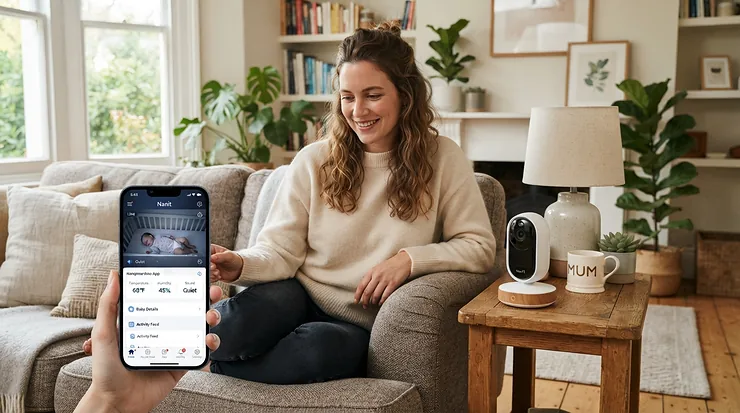
The Nanit Pro’s headline trick is turning an entire night of sleep into a scored, visual report card the next morning. The 1080p camera reads breathing motion through a specially patterned swaddle or sleepsack (no wires touching baby), while the companion app auto-captures short milestone clips and builds sleep trend graphs over weeks. What the spec sheet won’t tell you, but reviewers note, is that the full milestone and sleep-coaching feature set sits behind an Insights subscription — the camera hardware alone gives you a live video feed, but the “smart” part of a smart milestone tracking gadget experience is gated behind that add-on plan.
This is a strong fit for parents who want data visualization more than raw alerts: parents juggling shift work, multiple caregivers, or a strong interest in optimizing nap schedules based on real trend lines rather than gut feeling. Aggregated review sentiment is generally positive on video quality and the auto-generated highlight reels, but a recurring complaint centers on connectivity drops and the ongoing subscription cost for full functionality.
Pros:
- ✅ Auto-captured milestone clips without you lifting a finger
- ✅ Detailed sleep trend analytics over weeks, not just nights
- ✅ Works with multiple caregivers syncing to one account
Cons:
- ❌ Full milestone/sleep-coaching features require a paid Insights plan
- ❌ Wi-Fi connectivity issues reported by a portion of users
Priced in the $280-$330 range for the camera bundle before any subscription, the Nanit Pro Camera rewards parents who’ll actually open the app regularly to read the trends it generates.
3. Miku Smart Baby Monitor — best contactless option with no wearable
Miku’s entire pitch is “no wearables, no wires touching your baby” — it uses proprietary SensorFusion technology to detect breathing motion purely through the camera, working through blankets or in any sleep position. Here’s what to weigh: the trade-off for going wearable-free is a device that only works while baby is within camera view in the crib, so it won’t track vitals during contact naps or stroller rides the way a sock-based wearable would.
Based on the spec comparison with Owlet’s approach, the Miku Smart Baby Monitor is the better call for parents who tried a wearable and found their baby fought the sock, or who simply prefer nothing physically attached to their infant. Reviewers consistently flag the high price as the biggest sticking point, with several independent reviews noting it’s difficult to justify the cost purely for breathing detection when cheaper video monitors exist; the tradeoff is functionality most parents describe as reliable once installed correctly.
Pros:
- ✅ Zero wearable components — nothing touches the baby
- ✅ No monthly fee required for core video storage
- ✅ Tracks room temperature and humidity alongside breathing
Cons:
- ❌ One of the pricier options in this roundup, around $400
- ❌ Must stay plugged in and mounted — less portable than a wearable
At around $400, the Miku Smart Baby Monitor is a premium, values-based purchase for families explicitly avoiding wearables.
4. VAVA 5″ HD Baby Monitor — best budget smart nursery gadget
Not every family needs milestone AI — sometimes you just want to see and hear the crib without buying a subscription. The VAVA 5″ HD Baby Monitor ships with a dedicated 5-inch display rather than relying solely on a phone app, giving parents a screen that doesn’t compete with notifications, texts, and doomscrolling for attention. Key specs with real-world meaning: the standalone screen means no Wi-Fi dependency for core viewing, which is a meaningful reliability advantage during router outages or travel.
This is squarely for budget-conscious families who still want one of the smart nursery gadgets in their setup without premium biometric tracking. Aggregated marketplace feedback is largely positive on picture clarity for the price tier, with occasional notes about the two-way audio lagging slightly and the app-connected features feeling more basic than premium competitors.
Pros:
- ✅ Dedicated screen — no phone or app dependency for core use
- ✅ Meaningfully lower price than premium smart monitors
- ✅ Two-way audio included at this price point
Cons:
- ❌ No biometric (heart rate/oxygen) tracking available
- ❌ App features feel basic next to Nanit or Owlet
In the $85-$150 range, the VAVA 5″ HD Baby Monitor delivers real value for parents whose main need is visual reassurance, not developmental analytics.
5. Huckleberry: Baby & Child — best free app for sleep-first logging
Huckleberry built its reputation on SweetSpot, a feature that predicts a baby’s ideal nap window using logged sleep data, and it remains free at the core: sleep, feeding, diaper, and milestone logging cost nothing to use indefinitely. Reviewers consistently note that its one-touch logging interface is faster than competitors, which matters enormously at 3 a.m. when precision typing is not happening.
The honest analytical take: SweetSpot’s real predictive value kicks in once you’ve logged consistently for at least two weeks, so parents who log sporadically won’t see much benefit from the premium tiers. Aggregated app-store sentiment sits around a 4.9 average across tens of thousands of reviews, with praise concentrated on the sleep prediction feature and occasional criticism aimed at how quickly the free experience nudges users toward Plus or Premium membership.
Pros:
- ✅ Robust free tier covering sleep, feeding, and diaper logging
- ✅ SweetSpot nap-timing predictions once data accumulates
- ✅ Multi-caregiver sync across devices included free
Cons:
- ❌ Best predictive features locked behind Plus/Premium membership
- ❌ Requires consistent manual logging to be useful
Free to start, with Plus and Premium membership tiers in the modest monthly range, Huckleberry is the strongest all-around free milestone and sleep app in this list.

6. BabySparks — best structured activity-based milestone app
Where Huckleberry is sleep-first, BabySparks is development-first: it maps age-appropriate activities directly to milestone categories (motor, cognitive, social, language) and gives parents a daily task list rather than just a logging screen. The practical interpretation of that structure is that it suits parents who want to actively work toward milestones through guided play, not just record when they happen.
Subscription tiers vary from monthly to lifetime-access pricing, and the free tier only unlocks sample activities and milestone information — the full activity library, tracking tools, and articles sit behind a paywall. Reviewers consistently describe the activity suggestions as genuinely useful for first-time parents unsure what “age-appropriate play” even looks like, though some flag the subscription upsell prompts as frequent.
Pros:
- ✅ Activities mapped directly to specific milestone categories
- ✅ Useful for first-time parents unsure what to do at each age
- ✅ Multiple subscription lengths, including a lifetime option
Cons:
- ❌ Free tier is sample-only; full library requires payment
- ❌ Frequent subscription upsell prompts noted by users
Subscription pricing spans roughly $4-$30/month depending on term, with a lifetime-access option also available, making BabySparks worth it mainly for parents who’ll actually do the suggested activities.
7. Pathways.org Baby Milestones App — best free, expert-validated tracker
If budget is the only variable that matters, Pathways.org Baby Milestones App is free, ad-supported by nothing, and built by a nonprofit with milestones validated against CDC and American Academy of Pediatrics materials rather than in-house guesswork. It includes a milestone and abilities tracker, a tummy-time timer, and hundreds of pediatric-approved activity videos.
What most buyers overlook about this one is that “free” doesn’t mean thin — the personalized dashboard and video demonstrations rival paid competitors in depth, largely because Pathways.org is grant- and donation-funded rather than subscription-funded. Aggregated app-store sentiment sits around 4.9 stars across thousands of reviews, with parents and pediatric therapists both citing it as a genuinely trustworthy reference rather than a marketing funnel toward a paywall.
Pros:
- ✅ Completely free, including full milestone library
- ✅ Milestones validated against CDC and AAP sources
- ✅ Includes video demonstrations for each tracked skill
Cons:
- ❌ No hardware integration — manual entry only
- ❌ Lacks sleep-specific tools that dedicated sleep apps offer
At $0, Pathways.org is the easiest recommendation in this roundup for any parent hesitant to spend anything before deciding if milestone tracking apps are even useful to them.
Practical Usage Guide: Setting Up Your Baby Milestone Tracker Device vs App
Getting real value out of either category comes down to setup discipline in the first thirty days. For hardware — Owlet Dream Sock, Nanit Pro Camera, Miku Smart Baby Monitor, or the VAVA 5″ HD Baby Monitor — the single most common first-week mistake is mounting or fitting the device once and never rechecking it. Camera monitors drift out of frame as cribs get bumped during diaper changes; wearable socks loosen as babies gain weight faster than parents expect. Set a weekly phone reminder to physically recheck fit and camera angle for the first two months.
For apps like Huckleberry, BabySparks, and Pathways.org Baby Milestones App, the equivalent mistake is inconsistent logging — skipping entries during hard days, which is exactly when the data would be most useful. A better approach: log at three fixed anchor points daily (morning wake, midday, bedtime) rather than trying to catch every single event, since predictive features like SweetSpot need pattern data more than perfect completeness.
Maintenance-wise, wash Owlet fabric socks on the gentle cycle only and let the sensor pod air-dry fully before reattaching; wipe camera lenses on Nanit and Miku monthly, since dust genuinely degrades night-vision clarity. On the software side, back up app data periodically if the platform allows export — losing months of milestone history to an uninstalled app or a lost login is a common and entirely avoidable frustration. A common optimization trick across every option here: enable notifications selectively rather than for every event, or alert fatigue sets in fast and parents start ignoring genuinely important alerts along with the noise.

Real-World Scenarios: Which Baby Milestone Tracker Device vs App Fits Your Family
The anxious first-time parent, newborn, urban apartment. A couple with a 6-week-old in a one-bedroom apartment, both working from home in shifts, prioritized overnight reassurance above all else. The Owlet Dream Sock made sense here specifically because it doesn’t require anyone to be watching a screen — the base station alert does the watching, letting them actually sleep in shifts without staring at a monitor.
The budget-conscious family, second baby, suburban house. A parent expecting their second child, already burned out on subscriptions from the first round, wanted zero recurring costs and something proven. Pathways.org Baby Milestones App paired with the free tier of Huckleberry covered developmental tracking and basic sleep logging without a single subscription charge — appropriate given they’d already internalized most newborn logistics from experience.
The data-driven parent optimizing a toddler’s schedule. A parent of a 14-month-old who’d started fighting bedtime wanted trend analysis, not raw alerts. Nanit Pro Camera’s Insights subscription, paired with BabySparks for structured play targeting gross-motor milestones the toddler was behind on, gave them the week-over-week sleep and activity graphs needed to actually spot patterns rather than guess.
💬 Recognize your family in one of these? That’s usually the fastest way to skip decision paralysis.
How to Choose Between a Baby Milestone Tracker Device vs App
- Define your primary worry first. If it’s safety (breathing, oxygen, SIDS anxiety), lean device. If it’s developmental progress or activity ideas, lean app.
- Be honest about your logging discipline. Apps only work if you actually tap them; devices work passively regardless of your energy level.
- Check for wearable tolerance. Some babies fight socks and bands; if yours does, a contactless option like Miku beats a wearable like Owlet.
- Factor in the subscription trap. Hardware often has a cheap-looking sticker price with an expensive ongoing plan hidden behind “full features” — read the fine print before buying.
- Consider your Wi-Fi reliability. A standalone-screen device like the VAVA 5″ HD Baby Monitor keeps working through router outages; fully cloud-dependent options don’t.
- Think past the newborn stage. Apps like BabySparks and Pathways.org scale into toddlerhood; some hardware wearables age out around 30-40 pounds.
- Decide if you want one tool or two. Many of the happiest parents we researched combined one device for safety with one app for development, rather than expecting a single product to do everything.
Common Mistakes When Buying a Smart Milestone Tracking Gadget
The most expensive mistake is buying the most feature-loaded smart milestone tracking gadget available without checking whether its core features are gated behind a subscription — several buyers report feeling misled when “milestone tracking” turned out to require an add-on plan they didn’t budget for. A close second is skipping fit or mount verification after purchase; alerts are only useful if the sensor is actually reading data correctly, and a poorly seated sock or crooked camera generates false alarms that erode trust in the whole system within days.
Parents also frequently underestimate battery and charging logistics — wearables need daily charging routines built into an already exhausting schedule, and forgetting overnight charging defeats the entire purpose. Finally, many buyers don’t check age or weight limits before purchasing; a wearable rated for infants up to 30 pounds will need replacing or upgrading well before a toddler outgrows the need for monitoring altogether.
Wearable Milestone Tracker for Babies vs Baby Tracker Apps: Detailed Comparison
| Factor | Wearable Device (e.g., Owlet) | Tracker App (e.g., Huckleberry) |
|---|---|---|
| Data collection | Passive, continuous | Manual, parent-dependent |
| Upfront cost | $250-$400 range | Free–modest subscription |
| Best for | Safety/vitals monitoring | Developmental guidance |
| Portability | Limited to worn device | Works anywhere with a phone |
| Longevity | Ages out by weight/size | Scales through toddlerhood |
A wearable milestone tracker for babies wins decisively on passive reliability — it doesn’t care if you’re exhausted, it just measures. An app wins on flexibility and cost, scaling from newborn sleep logs to preschool activity suggestions without a hardware replacement cycle. For families torn between the two, the honest answer from the spec comparison is that they solve different anxieties, not the same one, which is exactly why so many parents in our research ended up using one of each rather than picking a single winner.

Data Privacy for Baby Apps: What Every Parent Should Know
Data privacy for baby apps deserves more attention than most parents give it during a 2 a.m. download decision. In the United States, apps and connected devices marketed to children under 13 fall under the Children’s Online Privacy Protection Act, which the FTC enforces to require clear notice, parental consent for data collection, and limits on how much information a service can gather. Baby monitor apps occupy a gray zone here — the child is the subject, but the parent is the account holder — so read each app’s privacy policy for specifics on video, audio, and biometric data retention rather than assuming COPPA automatically covers every feature.
Before enabling cloud sync on any wearable or camera, check three things: whether video/audio is stored locally or in the cloud by default, whether the company has published a data breach history, and whether you can fully delete your data on account closure. Nanit and Owlet both publish security details about encryption standards, which is a reasonable baseline to expect from any smart nursery gadget handling biometric data. For pure logging apps like Huckleberry or BabySparks, the bigger privacy question is usually third-party ad-network data sharing rather than biometric exposure, since they’re not collecting video or vitals at all.
Digital vs Physical Baby Tracker: Long-Term Cost & Maintenance
The digital vs physical baby tracker cost conversation rarely stops at the sticker price. A device like Owlet or Nanit requires a one-time hardware purchase, but full-feature access often depends on an ongoing Insights or membership plan, meaning the two-year cost of ownership can meaningfully exceed the box price. Apps flip this: most, like Huckleberry and Pathways.org, are free or low-cost monthly, but the “cost” shows up as time spent logging rather than dollars spent buying hardware.
| Approach | Year-One Cost Range | Ongoing Cost |
|---|---|---|
| Wearable/camera device | $250-$400 range | Optional monthly Insights plan |
| Free milestone app | $0 | None |
| Subscription app | Free–$120/yr range | Recurring |
Looking at the table, the cost-per-use math favors apps if you’ll genuinely use them consistently, but favors hardware if a single false-alarm-free night is worth more to your peace of mind than the subscription cost. For most families, a hybrid — one free app plus one budget-tier device — delivers the best total cost of ownership without sacrificing either safety monitoring or developmental guidance.
Smart Nursery Gadgets for Every Family: Tailored Advice
For beginners overwhelmed by choice, start with the free Pathways.org Baby Milestones App and add hardware later only if a specific worry (reflux, prematurity, sleep apnea concerns) justifies it. For budget-conscious families, the VAVA 5″ HD Baby Monitor paired with Huckleberry‘s free tier covers 90% of practical needs without a single subscription. For data-driven parents who genuinely want graphs and trend lines, Nanit Pro Camera with an Insights plan plus BabySparks gives the richest analytics stack in this roundup. For families of multiples or NICU graduates, prioritize a wearable like Owlet or contactless option like Miku first — vitals monitoring carries more weight than milestone logging in those early, higher-stakes months.

Frequently Asked Questions
❓ Is a baby milestone tracker device safe to use every night?
❓ Do free milestone tracking apps actually work as well as paid ones?
❓ Can I use a milestone app and a wearable device together?
❓ How long do wearable baby trackers typically last before needing replacement?
❓ What's the biggest privacy risk with smart nursery gadgets?
Conclusion
The baby milestone tracker device vs app question doesn’t really have a single winner — it has a right answer for your specific household. If overnight vitals monitoring is what keeps you up (ironically), a wearable like the Owlet Dream Sock or a contactless option like Miku earns its price tag. If developmental guidance and budget flexibility matter more, Pathways.org, Huckleberry, or BabySparks deliver real, expert-backed value without hardware costs. Many of the most satisfied parents in our research didn’t choose one category at all — they layered a free or low-cost app for daily logging with a single piece of hardware reserved for their biggest specific worry, and called it done.
Recommended for You
- Milestone Tracker App For First-Time Parents: 7 Picks For 2026
- 7 Best Budget Educational Tablets For A 2 Year Old In 2026
- AR Storybook vs Traditional Picture Book For Kids 2026: 7 Best Picks
Disclaimer: This article contains affiliate links. As an Amazon Associate, I earn from qualifying purchases. If you purchase products through these links, we may earn a small commission at no additional cost to you.
✨ Found this helpful? Share it with your friends! 💬🤗
